

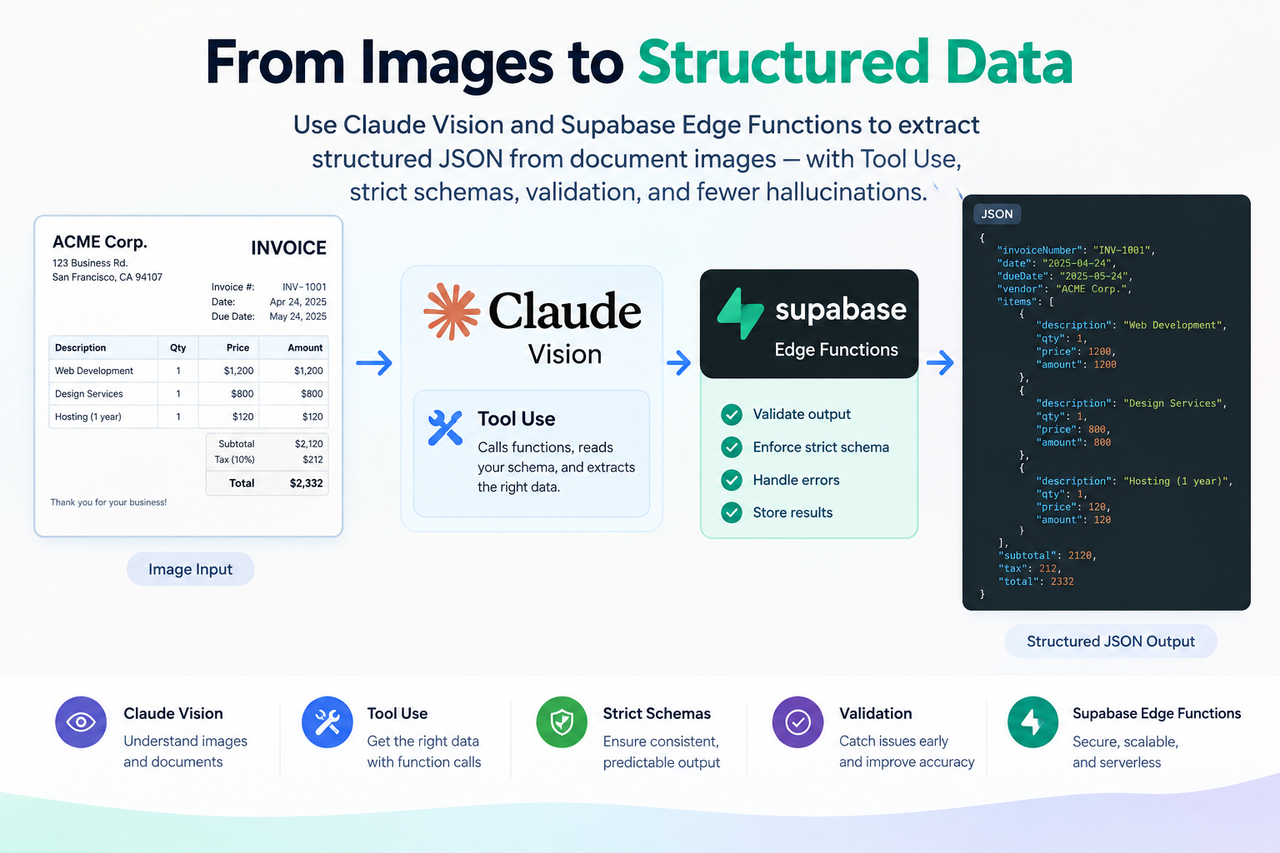
Extracting useful information from images is a common requirement in modern applications. Invoices, receipts, forms, identity documents, shipping labels, purchase orders, and other business documents often contain valuable data that applications need to process.
Traditionally, developers solve this problem using OCR (Optical Character Recognition) followed by custom parsing logic. While this approach works, it can become complicated when documents have different layouts, inconsistent formatting, tables, handwritten values, or multiple types of information.
Modern vision-capable AI models provide another option. In this tutorial, we will build a structured image-to-JSON extraction workflow using Claude Vision and Supabase Edge Functions.
More importantly, we will design the workflow to work toward zero hallucination by reducing opportunities for the AI to guess or invent information.
Important: “Zero hallucination” should not be interpreted as a guarantee that an AI model can never make a mistake. AI can still misread an image or incorrectly interpret information. The goal of this architecture is to minimize those risks, constrain the model's output, and make incorrect or uncertain results easier to identify.
What We Are Building
The goal is simple:
Input: An invoice image.
Output: Structured JSON containing information such as:
- Invoice number
- Vendor name
- Total amount
- Currency
- Line items
- Confidence score
For example, instead of returning a paragraph like:
The invoice number appears to be INV-10025 and the total amount is INR 12,500.
we want the model to return predictable JSON:
{
  "invoice_number": "INV-10025",
  "vendor_name": "Example Technologies Pvt Ltd",
  "total_amount": 12500,
  "currency": "INR",
  "line_items": [],
  "confidence_score": 0.96
}
This makes the AI response much easier for an application to consume.
Why Not Just Use OCR?
A traditional document-processing pipeline often looks like this:
graph LR
    A[Image] --> B[OCR]
    B --> C[Extracted Text]
    C --> D[Custom Parsing]
    D --> E[Regular Expressions]
    E --> F[Business Logic]
    F --> G[Structured Data]
Traditional document-processing pipeline
This approach can work well when document formats are predictable.
However, it becomes harder when:
- Different vendors use different invoice layouts.
- Labels change between documents.
- Tables move around.
- Fields are missing.
- Documents contain images and text together.
- The same information appears in different positions.
- Developers need to maintain many parsing rules.
A vision-capable LLM can reason about the visual structure of a document rather than simply converting pixels into text.
The architecture we will build looks like this:
flowchart LR
    A[Client Application] --> B[Supabase Edge Function]
    B --> C[Claude Vision API]
    C --> D[Forced Tool Use]
    D --> E[Structured JSON]
    E --> B
    B --> A
Vision Capable LLM
The important part is that we don't simply ask Claude:
"Read this invoice and tell me what is inside it."
Instead, we provide a strict extraction schema and force Claude to use that schema.
The Hallucination Problem
One of the biggest concerns when using generative AI for document processing is hallucination. Imagine that an invoice contains:
Invoice No: INV-1025
but the image is blurry.
A generative AI model might potentially interpret the value incorrectly. For example:
{
  "invoice_number": "INV-1028"
}
The problem becomes even more serious when AI-generated information is sent directly into:
- Accounting systems
- ERP systems
- Payment systems
- Databases
- Reporting systems
- Business workflows
Therefore, we need to design the application so that the AI has as little opportunity as possible to invent information.
Working Toward Zero Hallucination
The goal is not to claim that AI can never hallucinate. Instead, we can design the extraction pipeline to reduce hallucination risk.
Our approach uses several safeguards:
- Explicit extraction instructions
- No guessing
- A strict JSON schema
- Forced Tool Use
- Confidence scoring
- Application-level validation
The overall approach is:
flowchart TD
    A[Document Image] --> B[Claude Vision]
    B --> C{Information Clearly Visible?}

    C -->|Yes| D[Extract Value]
    C -->|No| E[Return null]

    D --> F[Strict Schema]
    E --> F

    F --> G[Application Validation]
    G --> H{Valid?}

    H -->|Yes| I[Store / Process]
    H -->|No| J[Review / Reject]
Designing pipeline to work toward zero hallucination
This is an important distinction. We are not eliminating the possibility of AI mistakes.
We are engineering the workflow to:
- Reduce guessing
- Constrain the output
- Represent unreadable information explicitly
- Detect invalid responses
- Validate data before using it downstream
1. Give the Model Explicit Instructions
Our system prompt should clearly tell the model what it is allowed to do. For example:
Extract information only from the provided image.

Do not guess, infer, estimate, or invent values.

If a value is missing, unreadable, or cannot be confidently determined
from the image, return null.

Return data only through the provided extraction tool.
AI Prompt - Establishing clear boundary
This is much safer than a generic prompt such as:
Extract invoice information from this image.
The first prompt establishes a clear boundary.
2. Never Ask the Model to Guess
Consider an invoice where the total amount is partially hidden.
Instead of encouraging the model to infer the value, we explicitly tell it:
If the value cannot be read from the image, return null.
For example:
{
  "invoice_number": "INV-1025",
  "vendor_name": "Example Ltd",
  "total_amount": null,
  "currency": "INR"
}
This is preferable to returning a fabricated value.
A null value gives the application an opportunity to:
- Ask a human to review the document
- Retry with a better image
- Request another document
- Mark the extraction as incomplete
3. Use a Strict Extraction Schema
Instead of allowing Claude to return arbitrary JSON, we define exactly what we expect.
Our example schema contains:
invoice_numbervendor_nametotal_amountcurrencyline_itemsconfidence_score
The schema also prevents additional unexpected properties.
{
  "type": "object",
  "properties": {
    "invoice_number": {
      "type": ["string", "null"]
    },
    "vendor_name": {
      "type": ["string", "null"]
    },
    "total_amount": {
      "type": ["number", "null"]
    },
    "currency": {
      "type": ["string", "null"]
    },
    "line_items": {
      "type": "array"
    },
    "confidence_score": {
      "type": "number"
    }
  },
  "required": [
    "invoice_number",
    "vendor_name",
    "total_amount",
    "currency",
    "line_items",
    "confidence_score"
  ],
  "additionalProperties": false
}
The exact schema can be expanded depending on your application. For example, you might add:
invoice_date
due_date
tax_amount
billing_address
shipping_address
purchase_order_number
The important concept is that the model is given a well-defined contract.
4. Use Claude "Tool Use"
Claude supports Tool Use, sometimes referred to as function calling. Instead of asking Claude to generate arbitrary text, we define a tool such as:
extract_invoice_data
Claude then returns the requested information through that tool.
Conceptually:
sequenceDiagram
    participant App as Client Application
    participant Edge as Supabase Edge Function
    participant Claude as Claude Vision

    App->>Edge: Send Base64 image
    Edge->>Claude: Image + extraction instructions + schema
    Claude->>Claude: Analyze image
    Claude->>Edge: Tool Use: extract_invoice_data
    Edge->>App: Structured JSON
This provides a predictable interface between the AI model and our application.
5. Force the Extraction Tool
Defining a tool alone is not enough.
We can explicitly tell Claude which tool must be used:
{
  "tool_choice": {
    "type": "tool",
    "name": "extract_invoice_data"
  }
}
This prevents the model from simply responding with a natural-language explanation. Instead, the application expects the structured extraction tool response.
This is an important part of making the workflow predictable.
6. Add a Confidence Score
A confidence score can provide another useful signal. For example:
{
  "invoice_number": "INV-1025",
  "vendor_name": "Example Technologies",
  "total_amount": 12500,
  "currency": "INR",
  "line_items": [],
  "confidence_score": 0.96
}
The application can then establish its own rules.
For example:
flowchart TD
    Start([Start]) --> Check{Confidence Level}

    Check -->|">= 0.90"| Auto[Automatic processing]
    Check -->|"0.70 to 0.89"| Val[Additional validation]
    Check -->|"< 0.70"| Human[Human review]
The confidence score should not be treated as proof that the answer is correct. It is simply another signal that can be combined with application-level validation.
Architecture
The complete architecture looks like this:
flowchart TD
    subgraph Client ["Client Layer"]
        A[Web / Mobile Client]
    end

    subgraph Backend ["Edge & Logic Layer"]
        B[Supabase Edge Function] --> C[Validate Request]
    end

    subgraph AI ["Claude Vision Layer"]
        D[Claude Vision API]
        D --> E[System Instructions]
        D --> F[Image Input]
        D --> G[Extraction Schema]
        D --> H[Forced Tool Use]
    end

    subgraph Persistence ["Output & Storage"]
        I[Structured JSON] --> J[Application Validation]
        J --> K[(Database)]
        J --> L[Human Review]
    end

    A -->|Base64 Image| B
    C --> D
    H --> I
The Supabase Edge Function acts as the secure server-side layer between the client and Claude. This means the client application does not need to expose the Anthropic API key.
Why Supabase Edge Functions?
Supabase Edge Functions are useful for this type of integration because they provide a server-side execution environment without requiring us to maintain a traditional application server.
Our function can:
- Receive the image.
- Validate the request.
- Read the Anthropic API key from secrets.
- Call Claude.
- Process the Tool Use response.
- Return structured JSON.
The architecture is therefore relatively small.
graph LR
    Client([Client]) --> Edge([Supabase Edge Function])
    Edge --> Claude([Claude])
    Claude --> JSON([Structured JSON])
    JSON --> Final([Client / Database])

    style Client fill:#01579b,stroke:#01579b,stroke-width:2px,color:#ffffff
    style Edge fill:#2e7d32,stroke:#2e7d32,stroke-width:2px,color:#ffffff
    style Claude fill:#d84315,stroke:#d84315,stroke-width:2px,color:#ffffff
    style JSON fill:#7b1fa2,stroke:#7b1fa2,stroke-width:2px,color:#ffffff
    style Final fill:#37474f,stroke:#37474f,stroke-width:2px,color:#ffffff
Technologies Used
This implementation uses:
| Technology | Purpose |
|---|---|
| Claude Vision | Image understanding |
| Anthropic Tool Use | Structured extraction |
| Supabase Edge Functions | Server-side processing |
| Deno | Edge Function runtime |
| TypeScript | Function implementation |
| JSON Schema | Output contract |
| Prompt Caching | Reduce repeated prompt overhead |
Prerequisites
Before starting, you should have:
- A Supabase project
- Supabase CLI installed
- An Anthropic API key
- Basic TypeScript knowledge
- Basic understanding of REST APIs
- An image to test with
You should also understand that API keys should never be exposed directly in frontend code.
Step 1: Create the Supabase Edge Function
Create a function named:
supabase functions new extract-image-data
This will create the Edge Function structure. Your function will ultimately be responsible for receiving the image and communicating with Claude.
Step 2: Store the Anthropic API Key
Store the API key as a Supabase secret:
supabase secrets set ANTHROPIC_API_KEY=your_anthropic_api_key_here
The application can then access the secret from the server-side function. This is preferable to putting the API key inside frontend JavaScript.
Step 3: Receive the Image
The client sends:
{
  "base64Image": "...",
  "mediaType": "image/jpeg"
}
The Edge Function validates that both values are present. For example:
if (!base64Image || !mediaType) {
  return new Response(
    JSON.stringify({
      error: "base64Image and mediaType are required"
    }),
    {
      status: 400,
      headers: {
        "Content-Type": "application/json"
      }
    }
  );
}
Step 4: Define the Extraction Schema
The extraction tool can be defined as:
const extractionTool = {
  name: "extract_invoice_data",
  description:
    "Extract structured invoice information from the provided image.",
  input_schema: {
    type: "object",
    properties: {
      invoice_number: {
        type: ["string", "null"],
        description: "Invoice number visible in the image."
      },
      vendor_name: {
        type: ["string", "null"],
        description: "Vendor or supplier name."
      },
      total_amount: {
        type: ["number", "null"],
        description: "Total invoice amount."
      },
      currency: {
        type: ["string", "null"],
        description: "Currency code such as INR or USD."
      },
      line_items: {
        type: "array",
        description: "Invoice line items."
      },
      confidence_score: {
        type: "number",
        description:
          "Confidence level of the extracted information."
      }
    },
    required: [
      "invoice_number",
      "vendor_name",
      "total_amount",
      "currency",
      "line_items",
      "confidence_score"
    ],
    additionalProperties: false
  }
};
The schema acts as the contract between Claude and our application.
Step 5: Build the System Prompt
The system prompt is particularly important for our hallucination-reduction strategy. For example:
const systemPrompt = `
You are a document data extraction assistant.

Extract information only from the provided image.

Do not guess, infer, estimate, or invent values.

If a value is missing, unreadable, ambiguous, or cannot be
determined from the image, return null.

Preserve values exactly as they appear in the document where
possible.

Return the extracted information only through the provided
extraction tool.
`;
Notice the important instructions:
- Only use information from the image.
- Don't guess.
- Don't estimate.
- Don't invent.
- Use
nullwhen information cannot be determined. - Use the predefined extraction tool.
These instructions don't make the AI infallible, but they establish a much safer extraction boundary.
Step 6: Send the Image to Claude
Claude accepts images as part of the message content. The request conceptually looks like:
const response = await fetch(
  "https://api.anthropic.com/v1/messages",
  {
    method: "POST",
    headers: {
      "Content-Type": "application/json",
      "x-api-key": anthropicApiKey,
      "anthropic-version": "2023-06-01"
    },
    body: JSON.stringify({
      model: "claude-3-5-sonnet-20241022",
      max_tokens: 1024,
      system: systemPrompt,
      tools: [extractionTool],
      tool_choice: {
        type: "tool",
        name: "extract_invoice_data"
      },
      messages: [
        {
          role: "user",
          content: [
            {
              type: "image",
              source: {
                type: "base64",
                media_type: mediaType,
                data: base64Image
              }
            }
          ]
        }
      ]
    })
  }
);
The image is therefore provided directly to the vision-capable model.
Step 7: Process the Tool Response
After Claude processes the image, we look for the Tool Use response. Conceptually:
const toolUse = responseData.content.find(
  (item: any) => item.type === "tool_use"
);

if (!toolUse) {
  throw new Error("No structured extraction returned");
}

const extractedData = toolUse.input;
The result should now be structured data instead of arbitrary natural-language text.
Step 8: Validate the Result
This step is extremely important. Never assume that AI-generated data is automatically trustworthy simply because it follows a schema.
Treat the AI response as untrusted input.
For example, your application can validate:
invoice_number → string or null
total_amount → number or null
currency → valid currency format
confidence_score → between 0 and 1
line_items → array
You can also implement business rules. For example:
total_amount must not be negative
confidence_score must be between 0 and 1
currency must be supported
invoice_number must match the expected format
This creates another protection layer.
The Complete Data Flow
At this point, our processing pipeline becomes:
flowchart TD
    A[Invoice Image] --> B[Client]
    B --> C[Supabase Edge Function]

    C --> D[Input Validation]
    D --> E[Claude Vision]

    E --> F[Image Analysis]
    F --> G[Strict Tool Schema]
    G --> H[Structured JSON]

    H --> I[Schema Validation]
    I --> J[Business Validation]

    J --> K{Valid Result?}

    K -->|Yes| L[Store / Process]
    K -->|No| M[Human Review]
This layered approach is much more useful than simply trusting an AI response.
Prompt Caching
There is another consideration when building production AI applications: repeated input. Our system prompt and extraction schema can be relatively large.
If every request sends the same instructions and schema, we may repeatedly send the same input to the model. Prompt caching can help with repeated static input.
The architecture becomes:
flowchart LR
    A[Request 1] --> B[System Prompt + Schema]
    B --> C[Prompt Cache]
    C --> D[Claude]

    E[Request 2] --> C
    F[Request 3] --> C
    G[Request N] --> C
The exact pricing, caching behavior, supported models, and cache duration depend on the Anthropic API capabilities available for the model/version you are using.
Therefore, treat prompt caching as an optimization rather than a requirement for the extraction workflow.
Complete Supabase Edge Function
Below is the complete example implementation.
import { serve } from "https://deno.land/std/http/server.ts";

const anthropicApiKey = Deno.env.get("ANTHROPIC_API_KEY");

if (!anthropicApiKey) {
  throw new Error("ANTHROPIC_API_KEY is not configured");
}

const extractionTool = {
  name: "extract_invoice_data",
  description:
    "Extract structured invoice information from the provided image.",
  input_schema: {
    type: "object",
    properties: {
      invoice_number: {
        type: ["string", "null"],
        description: "Invoice number visible in the image."
      },
      vendor_name: {
        type: ["string", "null"],
        description: "Vendor or supplier name."
      },
      total_amount: {
        type: ["number", "null"],
        description: "Total invoice amount."
      },
      currency: {
        type: ["string", "null"],
        description: "Currency code such as INR or USD."
      },
      line_items: {
        type: "array",
        description: "Invoice line items."
      },
      confidence_score: {
        type: "number",
        description:
          "Confidence level of the extracted information."
      }
    },
    required: [
      "invoice_number",
      "vendor_name",
      "total_amount",
      "currency",
      "line_items",
      "confidence_score"
    ],
    additionalProperties: false
  }
};

const systemPrompt = `
You are a document data extraction assistant.

Extract information only from the provided image.

Do not guess, infer, estimate, or invent values.

If a value is missing, unreadable, ambiguous, or cannot be
determined from the image, return null.

Preserve values exactly as they appear in the document where possible.

Return the extracted information only through the provided
extraction tool.
`;

serve(async (req) => {
  try {
    const body = await req.json();

    const {
      base64Image,
      mediaType
    } = body;

    if (!base64Image || !mediaType) {
      return new Response(
        JSON.stringify({
          error: "base64Image and mediaType are required"
        }),
        {
          status: 400,
          headers: {
            "Content-Type": "application/json"
          }
        }
      );
    }

    const response = await fetch(
      "https://api.anthropic.com/v1/messages",
      {
        method: "POST",
        headers: {
          "Content-Type": "application/json",
          "x-api-key": anthropicApiKey,
          "anthropic-version": "2023-06-01"
        },
        body: JSON.stringify({
          model: "claude-3-5-sonnet-20241022",
          max_tokens: 1024,

          system: systemPrompt,

          tools: [
            extractionTool
          ],

          tool_choice: {
            type: "tool",
            name: "extract_invoice_data"
          },

          messages: [
            {
              role: "user",
              content: [
                {
                  type: "image",
                  source: {
                    type: "base64",
                    media_type: mediaType,
                    data: base64Image
                  }
                }
              ]
            }
          ]
        })
      }
    );

    if (!response.ok) {
      const errorText = await response.text();

      console.error(
        "Anthropic API error:",
        errorText
      );

      return new Response(
        JSON.stringify({
          error: "Failed to process image"
        }),
        {
          status: 502,
          headers: {
            "Content-Type": "application/json"
          }
        }
      );
    }

    const responseData = await response.json();

    const toolUse = responseData.content?.find(
      (item: any) => item.type === "tool_use"
    );

    if (!toolUse) {
      return new Response(
        JSON.stringify({
          error: "No structured extraction returned"
        }),
        {
          status: 502,
          headers: {
            "Content-Type": "application/json"
          }
        }
      );
    }

    const extractedData = toolUse.input;

    console.log(
      "Token usage:",
      responseData.usage
    );

    return new Response(
      JSON.stringify({
        data: extractedData,
        usage: responseData.usage
      }),
      {
        status: 200,
        headers: {
          "Content-Type": "application/json"
        }
      }
    );

  } catch (error) {
    console.error(
      "Unexpected error:",
      error
    );

    return new Response(
      JSON.stringify({
        error: "Internal server error"
      }),
      {
        status: 500,
        headers: {
          "Content-Type": "application/json"
        }
      }
    );
  }
});
Deploy the Function
After creating the function and configuring the secret:
supabase secrets set ANTHROPIC_API_KEY=your_anthropic_api_key_here
Deploy it:
supabase functions deploy extract-image-data
Your Edge Function is now available for your application to invoke.
Testing the Function
You can test the function using curl.
For example:
curl -X POST \
  'https://YOUR_PROJECT_REF.supabase.co/functions/v1/extract-image-data' \
  -H 'Authorization: Bearer YOUR_SUPABASE_ANON_KEY' \
  -H 'Content-Type: application/json' \
  -d '{
    "base64Image": "YOUR_BASE64_IMAGE",
    "mediaType": "image/jpeg"
  }'
A successful response might look like:
{
  "data": {
    "invoice_number": "INV-1025",
    "vendor_name": "Example Technologies Pvt Ltd",
    "total_amount": 12500,
    "currency": "INR",
    "line_items": [],
    "confidence_score": 0.96
  },
  "usage": {
    "input_tokens": 1234,
    "output_tokens": 245
  }
}
The exact response and token usage will depend on the document and API response.
Understanding the Response
The most important part is:
"data": {
  "invoice_number": "INV-1025",
  "vendor_name": "Example Technologies Pvt Ltd",
  "total_amount": 12500,
  "currency": "INR"
}
Your application can now consume this data without writing complicated parsing logic for a natural-language response.
For example:
const invoiceNumber = result.data.invoice_number;

const totalAmount = result.data.total_amount;

const currency = result.data.currency;
Why Tool Use Is Better Than Parsing AI Text
Consider two approaches.
Approach 1: Free-form response
Claude might return:
The invoice number is INV-1025.
The vendor is Example Technologies.
The total is INR 12,500.
Your application then needs to extract the values. You might end up writing:
graph LR
    Regex([Regex]) --> Parsing([String parsing])
    Parsing --> SpecialCases([Special cases])
    SpecialCases --> ErrorHandling([Error Handling])

    style Regex fill:#01579b,stroke:#01579b,stroke-width:2px,color:#ffffff
    style Parsing fill:#2e7d32,stroke:#2e7d32,stroke-width:2px,color:#ffffff
    style SpecialCases fill:#d84315,stroke:#d84315,stroke-width:2px,color:#ffffff
    style ErrorHandling fill:#7b1fa2,stroke:#7b1fa2,stroke-width:2px,color:#ffffff
Approach 2: Tool Use
Claude returns:
{
  "invoice_number": "INV-1025",
  "vendor_name": "Example Technologies",
  "total_amount": 12500,
  "currency": "INR"
}
Now the application can directly consume the fields.
This doesn't guarantee that the values are correct, but it greatly reduces the complexity of handling the response format.
What Happens When Claude Cannot Read Something?
Suppose the invoice number is blurred. Our instructions tell Claude not to guess. The response should therefore be:
{
  "invoice_number": null,
  "vendor_name": "Example Technologies",
  "total_amount": 12500,
  "currency": "INR",
  "line_items": [],
  "confidence_score": 0.62
}
The application can then decide what to do.
For example:
flowchart TD
    A[Extracted Result] --> B{Confidence / Validation}
    B -->|High confidence| C[Automatic Processing]
    B -->|Medium confidence| D[Additional Validation]
    B -->|Low confidence| E[Human Review]
This is a much safer production pattern than blindly storing every AI-generated value.
Common Mistakes
Mistake 1: Putting the API Key in Frontend Code
Never do this:
const apiKey = "sk-ant-...";
inside frontend JavaScript.
Instead:
Frontend
   ↓
Supabase Edge Function
   ↓
Anthropic API
The secret remains on the server side.
Mistake 2: Trusting the AI Response
Even with Tool Use and a strict schema, AI output should not automatically be considered correct.
Always validate important fields.
For financial documents, you may want additional validation such as:
Invoice number format
Currency validation
Amount validation
Tax calculation
Line-item total validation
Vendor verification
Duplicate invoice detection
Mistake 3: Asking the Model to Guess
Avoid prompts such as:
If you cannot see the invoice number, infer what it probably is.
Instead:
If the invoice number cannot be determined from the image,
return null.
This is one of the simplest and most important safeguards in the entire workflow.
Mistake 4: Treating Confidence as Truth
A confidence score is useful, but it is not a guarantee.
For example:
{
  "confidence_score": 0.99
}
does not mean:
The answer is definitely correct.
It should be treated as one signal among several.
Production Improvements
The example above provides a foundation. A production implementation should consider additional safeguards.
Image Validation
Before sending the image to Claude:
- Validate MIME type.
- Limit file size.
- Reject unsupported formats.
- Consider image dimensions.
- Strip unnecessary metadata where appropriate.
Authentication
Do not allow an unauthenticated public endpoint to consume your Anthropic API quota.
Use Supabase authentication or another application-level authentication mechanism.
Rate Limiting
Consider rate limiting to protect against:
- Accidental request loops
- Abuse
- Excessive API costs
- Automated attacks
Retry Strategy
External API calls can fail.
A production system should distinguish between:
Temporary failure
Permanent failure
Invalid document
Invalid request
Authentication failure
Rate limit
and handle each appropriately.
Human Review
For business-critical workflows, introduce human review.
For example:
flowchart TD
    A[Document] --> B[AI Extraction]
    B --> C[Validation]

    C --> D{Result Quality}

    D -->|High| E[Automatic Processing]
    D -->|Medium| F[Secondary Validation]
    D -->|Low| G[Human Review]

    F --> H{Validated?}
    H -->|Yes| E
    H -->|No| G
This provides a practical safety net.
Security Considerations
Images can contain sensitive information.
Depending on the documents you process, they may include:
- Names
- Addresses
- Phone numbers
- Financial information
- Tax information
- Account numbers
- Business information
Therefore, you should consider:
- Data retention
- Logging policies
- Access control
- Encryption
- API security
- Compliance requirements
- Whether images should be persisted
- Whether extracted information should be persisted
Avoid logging entire documents or sensitive extracted data unless there is a clear reason to do so.
For example, instead of:
console.log(fullInvoiceData);
consider logging only operational information:
console.log({
  success: true,
  processingTimeMs,
  confidenceScore
});
Extending the Solution Beyond Invoices
Although this tutorial uses invoices, the same architecture can be adapted for many document types.
Examples include:
Receipts
Merchant
Date
Items
Tax
Total
Currency
Purchase Orders
PO Number
Vendor
Customer
Items
Quantity
Price
Total
Shipping Documents
Tracking Number
Sender
Recipient
Weight
Shipment Date
Forms
Name
Date
Address
Reference Number
Selections
Identity Documents
Depending on applicable laws, policies, and privacy requirements:
Name
Document Number
Date of Birth
Expiry Date
The extraction schema should be changed according to the document type.
A Reusable Architecture
The most interesting part of this approach is that the architecture does not need to change significantly when the document type changes.
Only the extraction schema and prompt need to evolve.
flowchart LR
    A[Document Image] --> B[Supabase Edge Function]
    B --> C[Document Type]

    C --> D[Invoice Schema]
    C --> E[Receipt Schema]
    C --> F[Purchase Order Schema]
    C --> G[Form Schema]

    D --> H[Claude Vision]
    E --> H
    F --> H
    G --> H

    H --> I[Structured JSON]
    I --> J[Validation]
This makes the approach reusable across multiple document-processing workflows.
Working Toward Safer AI Extraction
It is tempting to describe structured extraction as a zero-hallucination solution. However, that wording can be misleading.
A better engineering perspective is:
We work toward zero hallucination by reducing the opportunities for the model to guess, constraining what it can return, and validating the result before using it.
The model can still make mistakes.
For example, it may:
- Misread a character
- Confuse two similar values
- Misinterpret a table
- Fail to recognize a field
- Incorrectly understand a document layout
The architecture therefore focuses on reducing the impact of those mistakes.
The safeguards are:
graph TD
    A([1. Explicit instructions]) --> B([2. No guessing])
    B --> C([3. Strict schema])
    C --> D([4. Forced Tool Use])
    D --> E([5. Confidence signal])
    E --> F([6. Application validation])
    F --> G([7. Human review when necessary])

    style A fill:#1e293b,stroke:#3b82f6,stroke-width:2px,color:#ffffff
    style B fill:#1e293b,stroke:#3b82f6,stroke-width:2px,color:#ffffff
    style C fill:#1e293b,stroke:#3b82f6,stroke-width:2px,color:#ffffff
    style D fill:#1e293b,stroke:#3b82f6,stroke-width:2px,color:#ffffff
    style E fill:#1e293b,stroke:#3b82f6,stroke-width:2px,color:#ffffff
    style F fill:#1e293b,stroke:#3b82f6,stroke-width:2px,color:#ffffff
    style G fill:#1e293b,stroke:#ef4444,stroke-width:2px,color:#ffffff
This is a much more realistic approach to building reliable AI-powered applications.
Frequently Asked Questions
Can Claude extract text from images?
Yes. Vision-capable Claude models can analyze supported images and extract information from their contents.
For production applications, however, the important question is not simply whether text can be extracted, but whether the result can be returned in a predictable format.
Can Claude return JSON from an image?
Yes. One approach is to use Tool Use with a defined input schema.
This gives the application a structured representation instead of relying on free-form natural-language output.
Is this the same as traditional OCR?
Not exactly.
Traditional OCR primarily focuses on recognizing characters and converting them into text.
A vision-capable AI model can additionally interpret relationships between visual elements and understand the meaning of information in a document.
For production systems, either approach—or a combination of both—may be appropriate depending on accuracy, cost, document complexity, and compliance requirements.
Does Tool Use eliminate hallucinations?
No.
Tool Use helps constrain the format and structure of the model's response.
It does not guarantee that every extracted value is correct.
That is why application-level validation remains important.
Can this approach guarantee zero hallucination?
No.
There is no reason to claim that a generative AI system can never make a mistake.
The goal is instead to work toward zero hallucination by reducing guessing, requiring structured output, returning null for unreadable information, and validating the result before downstream processing.
Why return null instead of guessing?
Because an unknown value is often safer than an invented value.
For example:
{
  "invoice_number": null
}
allows the application to detect incomplete extraction and request human review.
An incorrect invoice number may silently enter a business system and create a much larger problem.
Can I use this for receipts?
Yes.
You can create a receipt-specific schema containing fields such as:
merchant
date
items
tax
total
currency
The same Edge Function architecture can be reused.
Why use Supabase Edge Functions?
They provide a convenient server-side execution layer for calling external APIs without exposing API credentials to the frontend.
They are particularly useful when your application already uses Supabase.
Conclusion
Vision-capable AI provides a powerful alternative to traditional OCR-and-parsing pipelines for extracting structured information from documents.
By combining:
- Claude Vision
- Explicit extraction instructions
- Strict JSON schemas
- Forced Tool Use
- Confidence signals
- Application-level validation
- Optional human review
we can build a document extraction workflow that is more predictable and easier to integrate with applications.
The important point is that this is not a claim of perfect or zero-hallucination AI.
Instead, we are deliberately engineering the workflow to work toward zero hallucination by minimizing opportunities for guessing and making uncertain results easier to detect.
The model may still make mistakes. Good engineering acknowledges that possibility and builds safeguards around it.
That is the real value of structured AI extraction: not pretending AI is infallible, but designing the system so that mistakes are less likely, more visible, and easier to handle.
Key Takeaways
If you remember only a few things from this tutorial, remember these:
- Don't rely on free-form AI responses when your application needs structured data.
- Define a strict schema for the information you need.
- Use Tool Use to constrain the response format.
- Tell the model not to guess or invent information.
- Return
nullwhen information cannot be reliably determined. - Treat AI output as untrusted input and validate it.
- Use confidence as a signal, not as proof of correctness.
- Use human review for low-confidence or business-critical cases.
- Keep API credentials on the server side.
- Think of “zero hallucination” as an engineering goal, not an AI guarantee.